
Guide · Working with Bluebeam users
How to open Bluebeam markups on a Mac, and send them back intact
The hardest part of working on a Mac in a Bluebeam office is the round trip. A consultant marks up a set in Revu, you add your comments, and it goes back. Here is how to keep every markup intact in both directions.
Ask the sender not to flatten their markups. Open the PDF in a Mac app that reads and writes standard PDF annotations, such as Project Blueprint 1.1.2. Edit their markups or add your own, then save. Your markups are written into the PDF, so the Bluebeam user sees them when they open the file in Revu.
How markups travel between apps
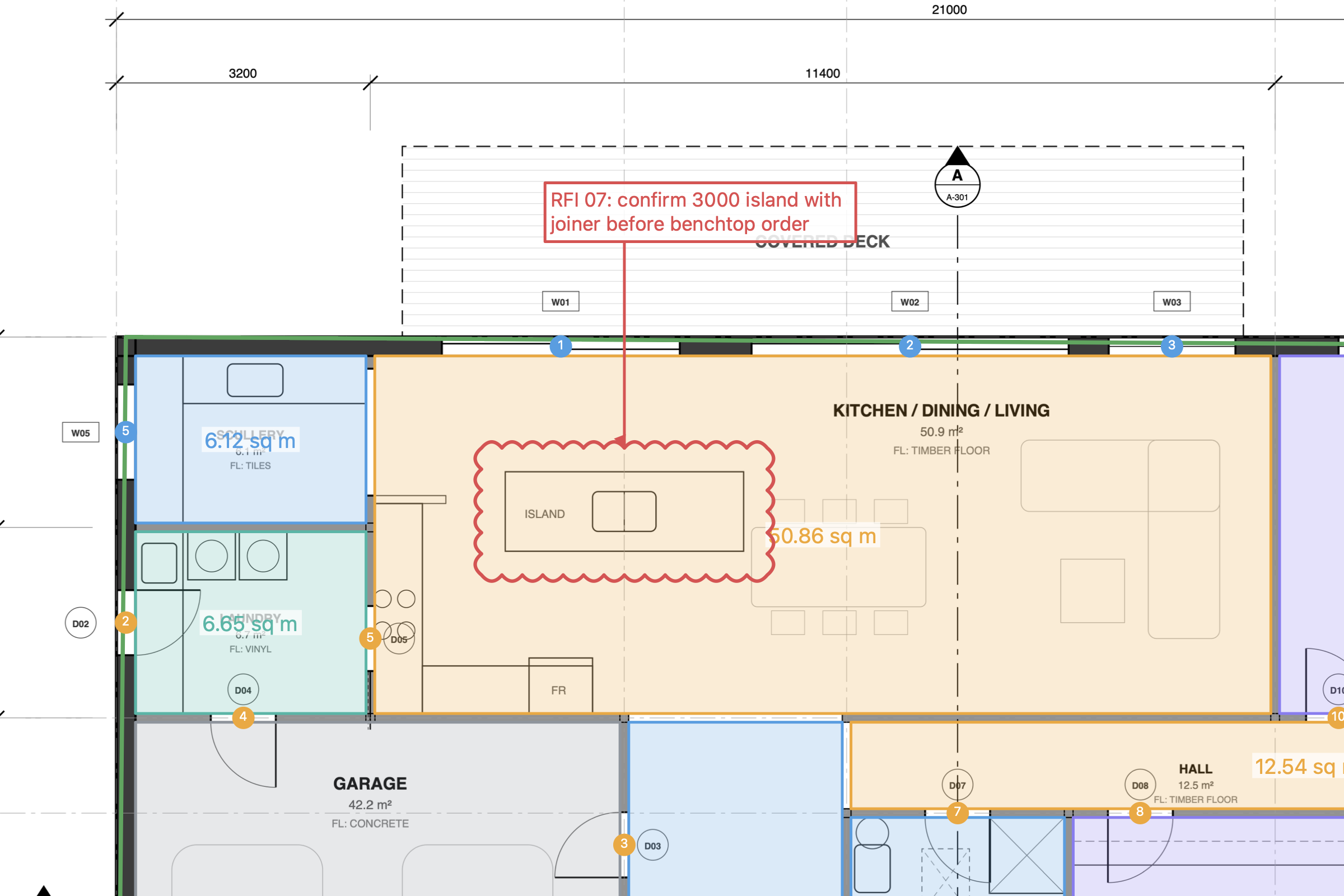
A PDF can carry two kinds of content: the drawing itself, and annotations that sit on top of it. Clouds, callouts, text boxes, highlights and stamps made in Bluebeam Revu are saved as annotations. That is why they can survive a trip to another app.
Two things break the round trip:
- Flattening. If the sender flattens markups before sending, they become part of the drawing. You will see them, but nobody can edit them again.
- Apps that keep markups to themselves. Some apps store your markups in their own files or cloud instead of in the PDF. Send that PDF to a Revu user and they see a clean drawing.
Step by step in Project Blueprint
- Open the PDF.Drag it onto Blueprint or use File › Open. Markups made in Bluebeam Revu or Acrobat appear on the sheet and can be selected and edited.
- Reply where it matters.Change a status, answer a callout, or add your own clouds, callouts and text. Each markup shows up in the Markups List, so you can filter, sort and group by subject, layer or page.
- Save.Press ⌘S. Blueprint writes your markups into the PDF itself, so anyone opening it in Bluebeam, Acrobat or Preview sees them. You can turn this off in Settings if you prefer to keep markups separate.
- Or send a copy.File › Save a Copy with Markups makes a separate PDF to send, without touching your working file.
- Send it back.Use File › Email PDF or Share PDF, or put it back in the project folder. The Revu user opens it as normal.
- Pick up their changes.If a colleague changes a markup in Revu or Acrobat and sends the file back, Blueprint picks up the change the next time you open it.
Sending markups without the drawing
Drawing sets can run to hundreds of megabytes. If both sides already have the same PDF, you can send only the markups:
- Export: File › Export Markups XML/FDF/XFDF saves your markups to a small file.
- Import: File › Import Markups XML/FDF/XFDF lays someone else's markups onto your copy of the drawing.
XFDF is a published standard for PDF comments, and Acrobat can import FDF and XFDF comment files too. Make sure both people have exactly the same revision of the drawing, or markups will land in the wrong place.
Tips that save arguments later
- Agree "don't flatten" up front. One line in the transmittal saves a lot of retyping.
- Use subjects consistently. If everyone tags RFIs as "RFI" and variations as "Variation", the Markups List sorts them for you on both platforms.
- Check the scale yourself. Treat quantities someone else measured as theirs. Use Measure › Verify Scale on each sheet before you rely on a number.
- Watch signed drawings. Blueprint never rewrites a digitally signed PDF just to add markups, so the signature stays valid. Use Save a Copy with Markups to send your comments on a signed set.
- Keep the revision in the file name. Markups travel with the PDF, so a clear name like
A-101 Rev C - HT comments.pdfavoids marking up the wrong issue.
If you don't use Blueprint
The same rules apply in any app. Check two things before you trust it with a Bluebeam office: that it can edit annotations made in Revu, and that it saves your markups inside the PDF rather than in its own database or cloud. Test it with one real file before a deadline.
Frequently asked questions
Can I see Bluebeam markups on a Mac without Bluebeam?
Usually, yes. Revu saves markups as PDF annotations, so Mac apps that read standard annotations can show them, including Preview, Acrobat and Project Blueprint. Whether you can edit them depends on the app.
Why can I see markups but not select them?
The sender probably flattened them. Flattening burns markups into the page so they become part of the drawing. They will display everywhere but can't be edited. Ask for an unflattened copy if you need to work with them.
Will my Mac markups show up in Bluebeam Revu?
They will if your app saves them as standard PDF annotations inside the file. Project Blueprint does this when you save, so Revu, Acrobat and Preview all show them.
What is XFDF?
XFDF is a standard file format for exchanging PDF comments and markups without sending the whole drawing. It is handy when the PDF is very large or when only the markups have changed.
Does Blueprint change a digitally signed drawing when I add markups?
No. Blueprint never rewrites a digitally signed PDF just to add markups, so the signature stays valid. Your markups are kept with Blueprint instead, and you can use Save a Copy with Markups to send a marked-up copy.
Sources
Prices and product details were checked on 13 October 2026. They change, so check each vendor's site before you buy.